
Up to 111 viewers can join for free in their browsers
One copy lets up to 111 players join for free.
Wishlist on Steam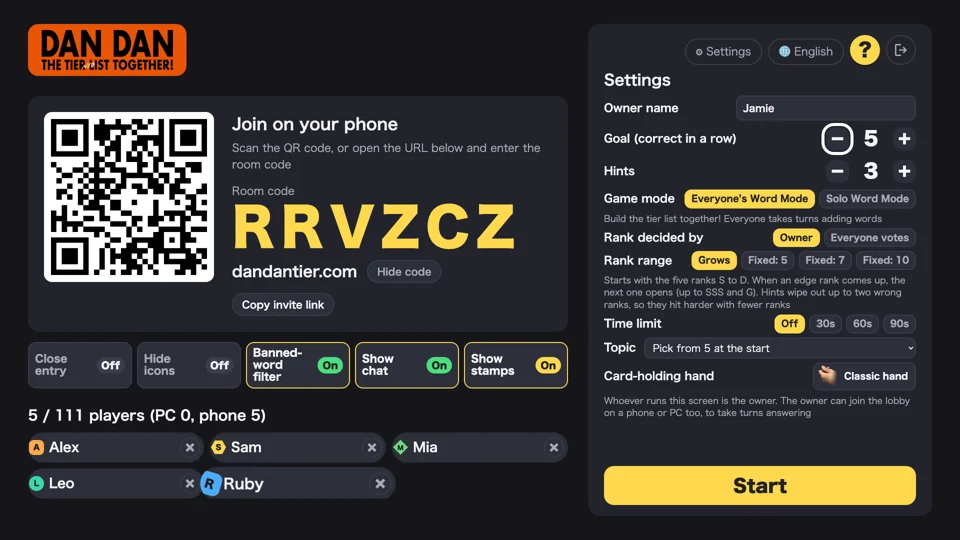
How to play with your viewers
Create a room
Launch the Steam version on your PC and create a room.
Invite your viewers
Copy the invite link from the lobby and send it to the viewers you want to play with. You can also display the QR code for viewers to scan.
Join in a browser
Viewers can open the invite URL on a phone or PC, scan the QR code, or enter the room code on the join page. They pick a name and join. No app required.
Hide the codes on stream
Select “Hide code” in the lobby to hide both the room code and the QR code. You can still copy the invite link while the codes are hidden. To put them back on screen, select “Show code” and confirm.
Review words and images before they appear
To keep disruptive submissions off the board, turn on approval for words or images. You can review them yourself or pick one viewer in the lobby as your moderator. That viewer sits out the game to review submissions.
Videos & streaming
Gameplay videos and streams are welcome, including monetized ones. We ask just two things:
- Include “DAN DAN THE TIER LIST TOGETHER!” in the title or description (required).
- We’d be glad if you add the Steam store page URL to the description (optional).